Blender 2.62 released

Blender is open source free 3d designing and animating software. It is a very awesome tool free of cost containing lots of cool features. It is a very useful tool for for graphics designing, and web developer. Blender 2.62 just released today (02/16/12) with some great new tools. There are a whole list of new and advance features are coming with the blender 2.62. The new blender contains better and improved Python Api, Uv Tools, Cycle Render Engine, Motion tracking and many new features. It also includes bug fixes and new add-on.


I am still downloading the file while writing this. If you are going to download today it might take a while to download for loads of traffic.I will probably try writing another article explaining more of the descriptions of the new features in the future after I actually use them. Go ahead and download now by going to the link below and click download blender 2.62 from the right. You can use blender from windows, Linux or mac so choose your operating system and download the file.


10 Best Free Blogger Templates You Should Check

Blogger is best platform for newbies. most of them confused which one theme to choose? Now don't confuse because Today We decided to present some of best free blogger templates. All of below are free and premium looking. We had added some of demo, download button with some description too. Hope you will enjoy them
See Also:

Android Mania Blogger Template


Android Mania blogger template


Demo | Download

Libera Blogger Template


Libera blogger template

Demo | Download

Community

Community

Grade Blogger Template

Another free 3 column magazine style blogger template with 2 sidebars, featured Section, fixed width, slider and and a handy top navigation bar.


Grade blogger template


Demo | Download

Instinct Blogger Template

Elegant magazine style blogger template with 1 Sidebar, 2 Column, 4 Column footer, featured section, header banner, slider, tabbed widget and easy top navigation menu.


Dreamy


Instinct blogger template


Demo | Download

Dreamy


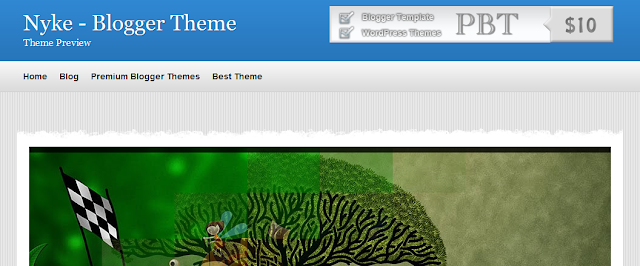
Nyke - Magazine Blogger Template

The Featured Slider, Image Slideshow has a very unique rounded bottom and a number of coll transitions between images.The template has a two column layout with right sidebar.

Nyke - Advanced Magazine Blogger Template


ProPress -Premium Looking Free Blogger Template

Propress  - Free Blogger Template


Conventy – Free Blogger Template

Converty  - Free Blogger Template

Hope you will be enjoy these great collections.

About the Author
Ammar is the a 16 Years old blogger. He loves to write about Tips, Tricks and Tutorials. He blogs at AllBloggingTips where he share Blogging Tips and Free Themes

Simple CSS menu with hover effect

If you don't like the classic blogger menus you can choose to use simple and cool menu with a hoover effect. The menu will show text and a link to your pages. It is very simple easy and will fit for most of the blogs. So let's get started with this.


First we have to add the CSS. 
  • Go to Blogger Dashboard>Design> Edit HTML
  • Backup your template 
  • Press CTRL+F and find ]]></b:skin> and paste the following code above it.


    ul#navlist {
        display: inline;
        list-style: none;
    }

    ul#navlist li {
        float: left;
        width: 60px;
        height:60px;
    }

    ul#navlist li a {
        width: 50px;
        height:50px;
        padding:5px;
        display:block;

    color:#fff;
        text-decoration: none;
        font-size:7pt;
        font-family:arial;
        line-height:50px;
        text-align:center;

    border-right:1px solid #fff;
        border-left:1px solid #fff;
        border-top: 5px solid #fff;
        border-bottom: 5px solid #fff;
        background: #003663;
    }

    ul#navlist li a:hover {
        border-top: 5px solid #004a80;
        border-bottom: 5px solid #004a80;
        background:#004a80;
        font-size:9pt;
        font-weight:bold;
    }


Once you have done that save your template.
Now, click on the button below and select your blog and add the code

Go to Blogger>Design>Page Element and edit "Custom Menu" and do the following changes


  • Change "one" "two"  "three" and so on with the text you want to show up inside the menu
  • You can delete a line <li> to </li> if you don't need them all
  • Change "#" without quote to the link corresponding to the text you choose for the menu

Optional:
  • You can drag the box inside the page element to choose where you want the menu to show up.
  • You can change it's color by customizing the CSS by changing the value of color hex #XXXXX


Credit:
The credit for the codes goes to CSSHowto.com
                                                                                                        

How to find nofollow links

The attribution rel="nofollow" is a important factor to keep your site safe from Google's black list. Do follows are also extremely important for the free flow of page rank flow for building traffic for new blogger. I have already discussed this topic and usage no follow on another article "What is nofollow and how should you use it?" You can also read a very good article by Pradosh about the importance of do follow comments here. Well let's get to the point. I will show you a common way which you can use to find nofollow links from all the blogs and app for popular browsers that will simply highlight the nofollow links.


Chrome App


1. Go to the app page and install it
2. Look at the top right for the new icon and click on it
3. Look all the way down and check the box for "Show Nofollow"
4. You will see a pink border around nofollow links now


Firefox Add on


1. Go to this add on page (credit: @Pradosh)
2. Click on "add to Firefox"
3. Let it download and install it, you will have to restart your browser
4. Right click on the browser and choose "NofolowDofollow"
5. The links will be highlighted and a red highlight means nofollow


Manual Action!


1. Go to the site and copy the link you want to   check
2. Right click on the page and click on "view source" or similar option
3. CTRL+F and search for the specific term
4. look around the link for the term "nofollow" ; before </a>
5. If you can't find it it is not a nofollow link


Do you have a better way of finding nofollow links or have any questions? Tell us in the comment below.